搜尋此網誌

2014年10月16日 星期四

How to export Facebook events to Google Calendar

https://www.facebook.com/help/152652248136178

  1. Click "Events" on the left.
  2. At the bottom right, right-click "Upcoming Events", and choose "Copy Link Location".
  3. In Google Calendar, click the down-arrow next to "Other calendars" and choose "Add by URL".
  4. Paste the URL which you copied in Step 2.  Press Enter.
  5. Wait for a few seconds and you'll see your Facebook events are automatically synchronized to your Google Calendar.

2014年6月23日 星期一

Disable the close multiple tabs warning in Firefox

https://support.mozilla.org/en-US/questions/971930

In Tools - Options -Tabs, I have already disabled "Warn me when closing multiple tabs".  However, this only affects the action when you click the red cross button at the right-top corner. 

If you want to disable the warning when you right-click a tab and choose "Close Tabs to the Right" or "Close Other Tabs", do the following:
  1. In the Location bar, type "about:config" and press Enter.
  2. In the Search field box at the top, type browser.tabs.warnOnCloseOtherTabs.
  3. Double-click the browser.tabs.warnOnCloseOtherTabs preference to set its value to false.

2013年5月10日 星期五

How to set Notepad default format to Word Wrap

http://www.techtin.com/windows-7/how-to-set-notepad-default-format-to-word-wrap/
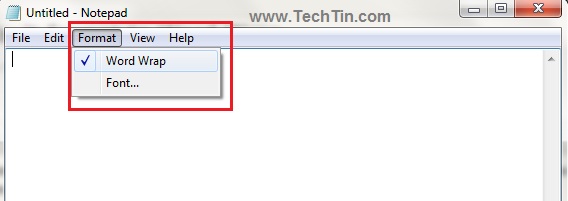
  1. You can enable / disable word wrap from Format >> Word Wrap
    http://www.techtin.com/wp-content/uploads/2011/05/53.jpg
  2. If you want to enable word wrap by default, modify windows registry:
    1. regedit
    2. Navigate to HKEY_CURRENT_USER\Software\Microsoft\Notepad,
      • Add a key "fWrap" (Double Word) with value 1.
    3. Close the registry manager.


2013年4月9日 星期二

Connect WinXP to Win7 via Remote Desktop

  • http://blogs.yyes.chc.edu.tw/post/2/3607
  • When trying to connect to win7-cc, WinXP shows an error message "遠端電腦需要網路層級驗證".
  • 在 mstsc 點左上角,選「關於」,可看到「不支援網路層級驗證」 (Network Level Authentication, NLA)
  • regedit
    1. 找到「HKEY_LOCAL_MACHINE\SYSTEM\CurrentControlSet\Control\Lsa」的「Security Packages」加入「tspkg」
    2. 將「HKEY_LOCAL_MACHINE\SYSTEM\CurrentControlSet\Control\SecurityProviders」的「SecurityProviders」數值資料最後再加入「,credssp.dll」
  • Now mstsc can connect to Windows 7, but authentication still fails.
  • Download Remote Desktop 7.0 http://www.microsoft.com/zh-tw/download/details.aspx?id=20609
  • 發生驗證錯誤。要求的安全性封裝不存在。
  • Restart WinXP. Now you can login successfully. (So maby you don't need to install KB969084.)

2012年11月7日 星期三

IPv6 support in VNC Viewer E4.1.7/P4.1.2


VNC Viewer E4.1.7 & P4.1.2 are fully IPv6-aware, and can connect to hosts specified by IPv4 address, IPv6 address or by DNS name. In the case of DNS names, VNC Viewer will attempt to connect to each address associated with the host name in turn until a connection succeeds. If a host has both IPv4 and IPv6 addresses registered with DNS then VNC Viewer will usually attempt to connect first using IPv6, and fall back to IPv4 only if that fails.

VNC Viewer uses the colon (":") as the delimiter between hostname and port number, which clashes with IPv6 addresses' use of the same character as a separator. VNC Viewer therefore allows hostnames and addresses to be escaped by enclosing them within square braces ("[" and "]"), preventing colon separators from being mis-interpreted as port number delimiters.

Handling of IPv6 addresses is dealt with by the host operating system. Compliance with the IPv6 specification is therefore dependent upon the support provided by the host operating system. In particular, functionality such as embedded IPv4 addressing (.e.g addresses such as ::ffff:192.168.0.1) is not supported on some systems.

VNC Server E4.1.7 & P4.1.2 are fully IPv6-aware, but is shipped with IPv6 support disabled by default, for security reasons. IPv6 can be enabled by setting "InTransports=IPv6,IPv4" (the default being IPv4 only), either on the command-line when starting vncserver under Unix, or in the registry on Windows systems.

2012年6月19日 星期二

[FreeBSD] 在shell的命令列下直接打中文


> 在ssh登入後, 可以看中文, 也可以在editor裡打中文,
> 但就是在command line下不能打中文
 
http://www.csie.nctu.edu.tw/~chlo/web/docs/doc/data/freebsd/12.htm
 
[for bash]
在~/.inputrc裡加下如下的設定
# inputrc - global inputrc for libreadline
# See readline(3readline) and `info rluserman' for more information.

# Be 8 bit clean.
set meta-flag on
set input-meta on
set output-meta on

# To allow the use of 8bit-characters like the german umlauts, comment out
# the line below. However this makes the meta key not work as a meta key,
# which is annoying to those which don't need to type in 8-bit characters.
set convert-meta off


[for tcsh]
在 ~/.login 或 ~/.cshrc 增加設定如下:

#stty cs8 -istrip
#stty pass8
setenv LANG zh_TW.Big5
setenv LC_CTYPE zh_TW.Big5
set dspmbyte="
0000000000000000000000000000000000000000000000000000000000000000
2222222222222222222222222222222222222222222222222222222222222220
2333333333333333333333333333333333333333333333333333333333333333
3333333333333333333333333333333333333333333333333333333333333330"

請將 dspmbyte 在 "" 中的字串接起來。

關於 dspmtype 設定的原因是因為在 tcsh 的 man page 中,
對照 Big5 的使用字碼表 [\x81-\xFE][\x40-\x7E\x80-\xFE] 而設定的。

2012年3月14日 星期三

Fixing the Firefox 7 and 8 missing http://

http://wattsupwiththat.com/2011/11/08/fixing-the-firefox-missing-http/

Instead of http://www.example.com, Firefox 7 will be displaying www.example.com, since September 2011. The purpose is to highlight the current browser location in a much more meaningful way and drop the protocol prefix, which has been confusing especially to users that are new or not familiar with the Internet. Firefox also greys out the "www" or subdomain of a URL, as well as the resource ID and deletes any trailing single slashes in a web address.

When you copy the URL from the address bar and paste it to another window, Firefox is supposed to add the http:// back when copy/paste work is done.. However, it doesn’t always work, hence you may easily make a link in a blog post the http:// which prompted a slew of “dead link” complaints.

This “feature” is annoying, so you may wish to solve it by
  1. Type about:config in Location (address) bar, press Enter
  2. Filter for browser.urlbar.trimURLs (or scroll until you find it)
  3. Right-click or double-left-click on that phrase and toggle it to false